
Top Architecture Software Every Student Must Know | Pakistan 2026
Learn the essential architecture software every student must know, from AutoCAD to Lumion, for drafting, modeling, and visualization in Pakistan.
Introduction — Essential Tools for Architecture Students
For architecture students in Pakistan, mastering digital tools is no longer optional — it is critical for academic success and future employment. Modern architectural projects rely heavily on software for drafting, 3D modeling, rendering, visualization, and project management. This guide covers the top architecture software every student should know, including key features, benefits, and learning tips.
AutoCAD — The Foundation of Architectural Drafting
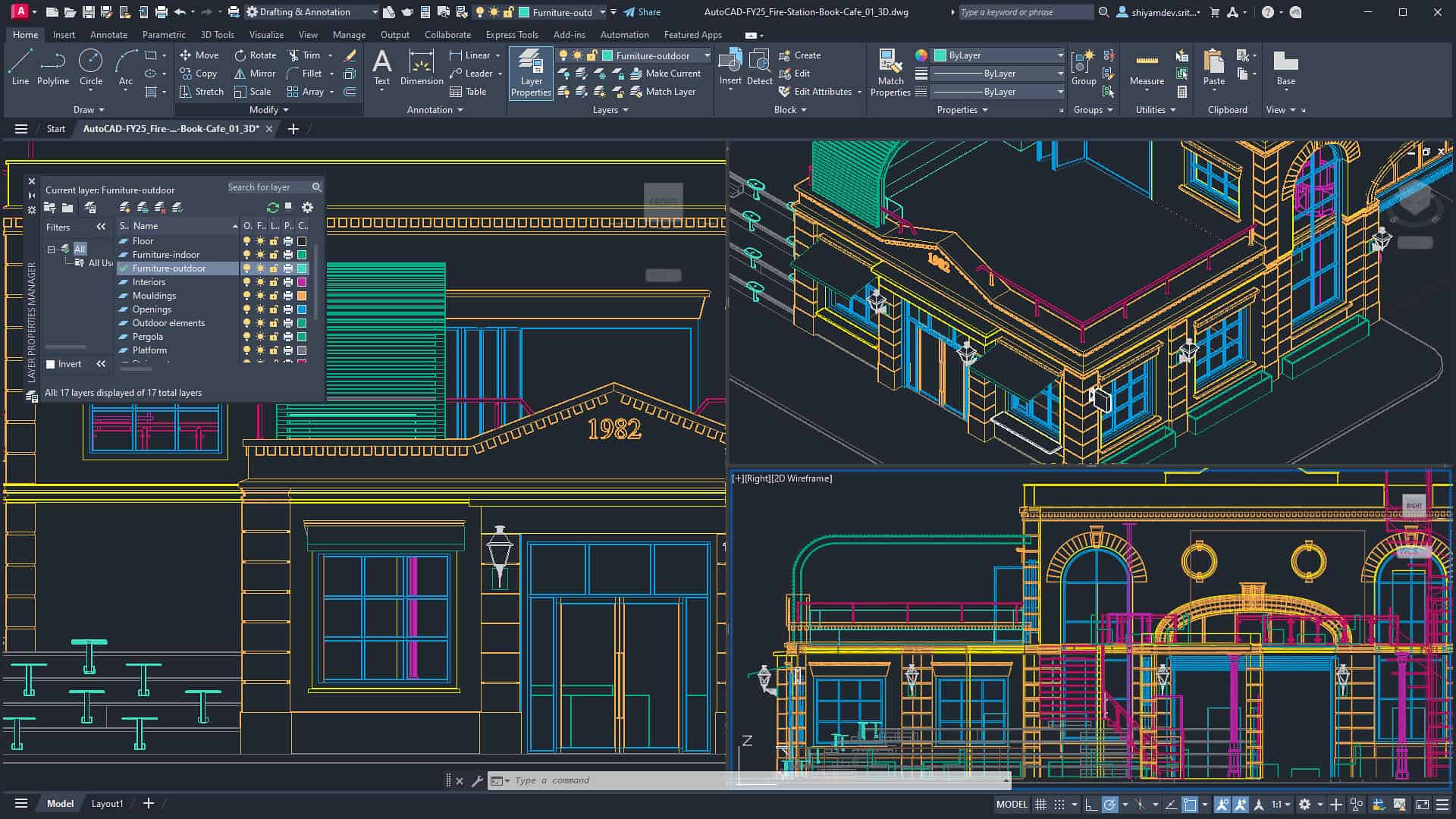
AutoCAD is the industry-standard drafting software, allowing students to create precise 2D drawings and 3D models. It is used in almost every architectural firm in Pakistan and is essential for beginners.
- 2D drafting and documentation for floor plans, sections, and elevations
- 3D modeling for conceptual visualization
- Layer management for organized projects
- Compatibility with Revit, SketchUp, and other software
- Customizable tool palettes and scripts for efficiency
Students are encouraged to practice AutoCAD by drafting real-world buildings, academic projects, and converting sketches into precise digital drawings.
Revit — BIM and Building Design
Revit is a Building Information Modeling (BIM) software that helps students design complex buildings with detailed components, allowing collaboration and accurate documentation.
- 3D modeling with parametric building elements
- Real-time updates for collaborative projects
- Accurate construction documentation and schedules
- Energy analysis, clash detection, and material takeoffs
In Pakistan, Revit skills give students an advantage for internships, architectural competitions, and firms adopting sustainable and smart design.
SketchUp — Quick 3D Modeling for Conceptual Design
SketchUp is ideal for creating quick 3D models and conceptual designs. Its user-friendly interface makes it perfect for students starting 3D visualization.
- Rapid 3D modeling and prototyping
- Interior and exterior visualization
- Integration with Lumion, AutoCAD, and Revit
- Custom textures and interactive walkthroughs
SketchUp’s intuitive workflow allows students to transform ideas into polished visual presentations in a fraction of the time.
3ds Max — High-End Rendering and Visualization
3ds Max is used for professional rendering, animations, and architectural visualization. It is ideal for students specializing in design presentations.
- Photo-realistic rendering using V-Ray or Corona
- Animation for walkthroughs and flythroughs
- Detailed modeling with advanced textures and lighting
Mastering 3ds Max allows students to create portfolios that impress clients and design firms.
Lumion — Real-Time Architectural Visualization
Lumion enables architects to quickly render realistic images and videos from 3D models. Its library and effects save time while producing professional presentations.
- Real-time rendering for 3D models
- Extensive material and object library
- Weather, lighting, and environmental effects
- Seamless import from SketchUp, Revit, or 3ds Max
Students in Pakistan use Lumion for competitions, final-year projects, and client presentations.
ArchiCAD — BIM Focused Design
ArchiCAD is BIM-focused and helps students manage complex architectural projects efficiently.
- Integrated BIM workflow
- Parametric objects and smart building elements
- Energy analysis and documentation tools
Learning ArchiCAD prepares students for firms in Pakistan adopting BIM for design efficiency and collaboration.
Blender — Free 3D Modeling and Visualization
Blender is open-source software used for 3D modeling, animation, and rendering. It is ideal for students who want professional results without spending on licenses.
- Realistic architectural visualizations
- Animation and walkthroughs
- Flexible rendering options for interiors and exteriors
Blender’s free access allows students in Pakistan to create high-quality portfolios on a budget.
Software Comparison — Quick Reference
Here’s a comparison of the most popular architecture software for students:
| Software | Best For | Learning Curve | Cost |
|---|---|---|---|
| AutoCAD | 2D Drafting / 3D Modeling | Moderate | Paid / Student License |
| Revit | BIM / Building Design | Steep | Paid / Student License |
| SketchUp | Conceptual 3D Modeling | Easy | Free / Paid Pro |
| 3ds Max | Rendering & Animation | Steep | Paid / Student License |
| Lumion | Real-Time Visualization | Moderate | Paid |
| ArchiCAD | BIM / Collaborative Projects | Moderate | Paid / Student License |
| Blender | 3D Modeling & Animation | Moderate | Free |
Tips for Learning Architecture Software
- Start with one software at a time (e.g., AutoCAD → SketchUp)
- Follow architecture-specific online tutorials and YouTube channels
- Recreate real buildings and projects for practice
- Combine software for better visualization (e.g., AutoCAD + Lumion)
- Create mini-projects for portfolio development
- Join online communities for peer feedback
Frequently Asked Questions (FAQs)
Which architecture software should I learn first as a student in Pakistan?
For beginners, start with AutoCAD to master 2D drafting and basic 3D modeling. Once comfortable, move on to SketchUp for conceptual designs or Revit for BIM-based projects.
Is Revit better than AutoCAD for architecture students?
Revit is focused on Building Information Modeling (BIM), while AutoCAD is ideal for precise drafting and 2D/3D plans. Both are essential skills for architecture students.
Can I use free software for architecture projects and portfolios?
Yes, Blender and SketchUp Free are excellent for students to create professional-grade visualizations and 3D models without expensive licenses.
Which software is best for high-quality architectural rendering?
3ds Max with V-Ray or Lumion is considered best for realistic architectural rendering and animations, ideal for portfolios and competitions.
How can mastering architecture software improve my career in Pakistan?
Proficiency in AutoCAD, Revit, SketchUp, and rendering tools increases employability, strengthens portfolios, and prepares students for modern firms.
How long does it take to learn architecture software effectively?
With consistent practice, basic proficiency can be achieved in 2 to 3 months, while advanced tools like Revit or 3ds Max may take 6 to12 months.
Can I combine multiple architecture software for better project outcomes?
Yes! Using AutoCAD for drafting, SketchUp for modeling, and Lumion or 3ds Max for rendering results in professional-quality projects.
Which software is suitable for interior design and visualization?
SketchUp, Lumion, and Blender are excellent for interior design, offering realistic materials, lighting, and walkthroughs.
Are there student licenses available for paid architecture software in Pakistan?
Yes. AutoCAD, Revit, 3ds Max, ArchiCAD, and Lumion offer free or discounted student licenses. Blender is completely free and open-source.
Should I focus on one software or learn multiple as a student?
Start with one software to build a strong foundation, then expand to multiple tools. Employers value versatility across drafting, BIM, and visualization software.
Conclusion — Prepare Yourself for the Architecture World
Learning architecture software is essential for students in Pakistan. Mastering tools like AutoCAD, Revit, SketchUp, 3ds Max, Lumion, ArchiCAD, and Blender equips you to draft, model, visualize, and present designs effectively. Combining software knowledge with practical projects ensures strong portfolios, improves employability, and prepares students for internships, competitions, and a successful architecture career.