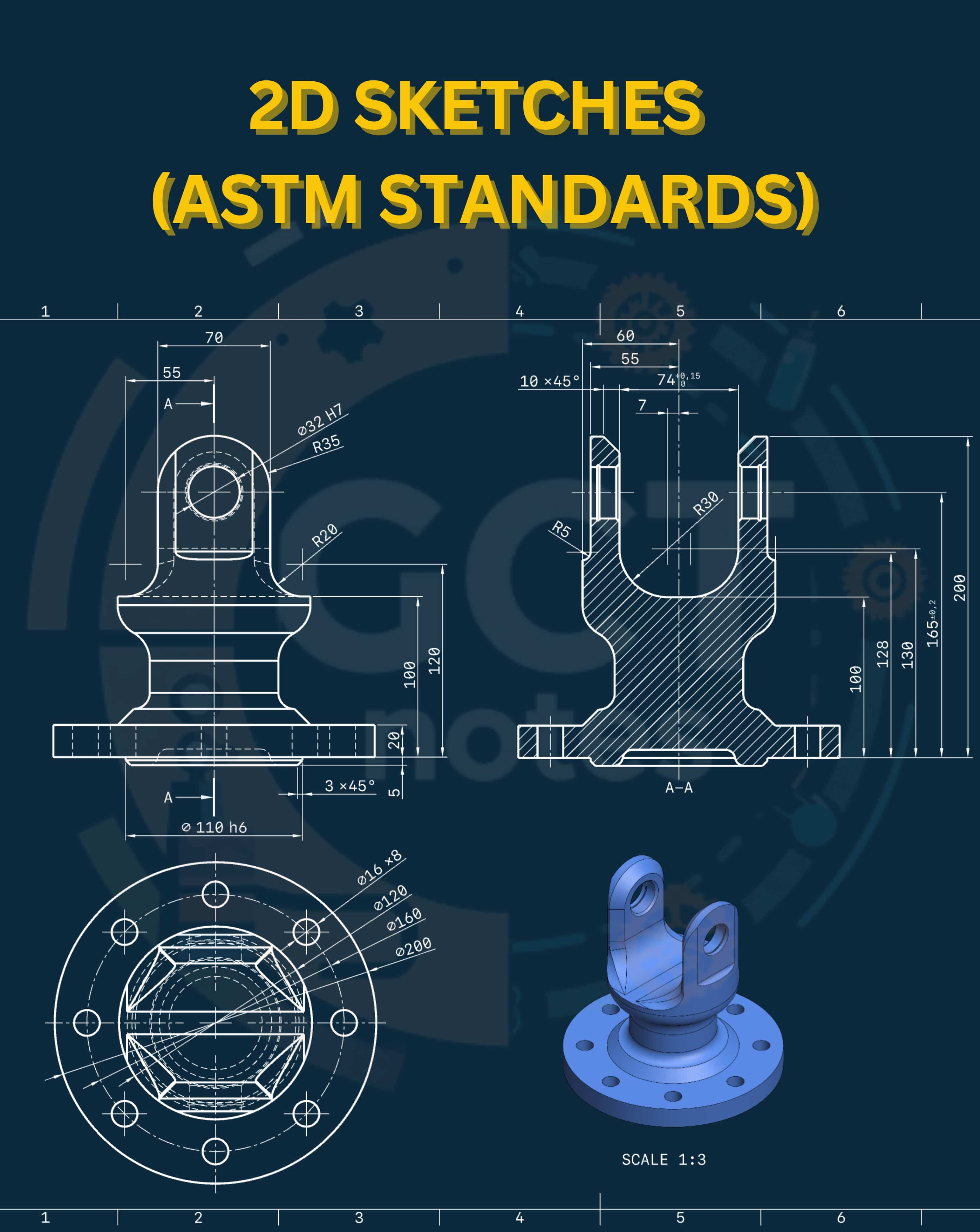
2D SKETCHES (ASTM STANDARDS)
Other Chapters
INTRODUCTION TO 2D AND 3D CAD2D SKETCHES (ASTM STANDARDS)DIMENSIONS AND CONSTRAINTS (ASTM STANDARDS)TOLERANCES (ASTM STANDARDS)SOLID MODELINGASSEMBLY MODELINGDRAWING VIEWPRESENTATION MODULESHEAR METAL COMPONENTSCAM (COMPUTER AIDED MANUFACTURING)PROCESS PLANNING
- Q1: What is ASTM?Ans: ASTM stands for American Society for Testing and Materials, an organization that develops international standards for materials, products, systems, and services.
- Q2: What is the ASTM standard?Ans: An ASTM standard is a document that provides technical guidelines, specifications, and procedures to ensure materials and products are tested and manufactured consistently.
- Q3: Define a Line.Ans: A line is a straight one-dimensional figure having length but no thickness, connecting two points in a drawing.
- Q4: Write down the drawing display units.Ans: Common drawing display units are:
- ➔ Millimeters (mm)
- ➔ Centimeters (cm)
- ➔ Meters (m)
- ➔ Inches (in)
- ➔ Feet (ft)
- Q5: Write any four 2D sketching entities.Ans: Some 2D sketching entities are:
- ➔ Line
- ➔ Circle
- ➔ Rectangle
- ➔ Arc
- Q6: Write any four 3D sketching entities.Ans: Some 3D sketching entities are:
- ➔ Plane
- ➔ Axis
- ➔ Point
- ➔ 3D Sketch Line
- Q7: What are Sketch based features in Solidworks?Ans: Sketch-based features are shapes created from 2D sketches like extrude, revolve, and sweep that form 3D models.
- Q8: What are Placed features in Solidworks?Ans: Placed features are 3D elements added directly without sketches, like fillets, holes, and chamfers.
- Q9: How to invoke/open the Part Modelling Environment in Solidworks?Ans: Click on 'File' → 'New' → 'Part' to open the Part Modelling Environment.
- Q10: How to invoke/open the Sketching Environment in Solidworks?Ans: Select a plane or face, then click on the 'Sketch' button to enter the Sketching Environment.
- Q11: How can you navigate a model in Solidworks?Ans: You can rotate, zoom, and pan using the mouse or navigation tools to view the model from different angles.
- Q12: What are Sketching entities in Solidworks?Ans: Sketching entities are 2D shapes like lines, circles, and arcs used to create 3D features.
- Q13: What is the procedure for drawing a line in Solidworks?Ans:
- ➔ Select the Line tool.
- ➔ Click the start point.
- ➔ Drag to the endpoint.
- ➔ Click again to finish the line.
- Q14: What is the procedure for drawing an arc by using a line tool in Solidworks?Ans:
- ➔ Draw two connected lines.
- ➔ Use the 'Fillet' or 'Convert to Arc' option to form an arc between them.
- Q15: What is the procedure for drawing an arc by using a centerpoint arc tool in Solidworks?Ans:
- ➔ Select the Centerpoint Arc tool.
- ➔ Click the center point.
- ➔ Click the start point of the arc.
- ➔ Click the endpoint of the arc.
- Q16: What is the procedure for drawing a Centre line in Solidworks?Ans:
- ➔ Use the Centerline tool.
- ➔ Click the starting point.
- ➔ Drag to the endpoint.
- ➔ Click to create the construction line.
- Q17: What is the procedure for drawing a Midpoint line in Solidworks?Ans:
- ➔ Select the Midpoint Line tool.
- ➔ Click the midpoint of a segment.
- ➔ Draw the line symmetrically from the midpoint.
- Q18: What is the procedure for drawing a rectangle in Solidworks?Ans:
- ➔ Select the Rectangle tool.
- ➔ Click one corner of the rectangle.
- ➔ Drag to the opposite corner.
- ➔ Click to complete the rectangle.
- Q19: What is the Corner Rectangle tool in Solidworks?Ans: The Corner Rectangle tool draws a rectangle by selecting two opposite corners.
- Q20: What is the procedure for drawing a rectangle using the Center Rectangle Tool in Solidworks?Ans:
- ➔ Select the Center Rectangle tool.
- ➔ Click the center point.
- ➔ Drag outward to define the rectangle size.
- ➔ Click to finish the rectangle.
- Q21: What is a 3 point Corner rectangle in Solidworks?Ans: It is a rectangle created by selecting three points: two corners and one point along an edge.
- Q22: What is the procedure for drawing a rectangle using the 3 point Corner rectangle Tool in Solidworks?Ans:
- ➔ Select the 3 Point Corner Rectangle tool.
- ➔ Click three points to define two corners and one edge.
- ➔ Click to complete the rectangle.
- Q23: What is a 3 point Center rectangle in Solidworks?Ans: It is a rectangle drawn using the center point and two points on the edges.
- Q24: What is the procedure for drawing a rectangle using the 3 point Center rectangle Tool in Solidworks?Ans:
- ➔ Select the 3 Point Center Rectangle tool.
- ➔ Click the center point.
- ➔ Click two points on the sides to define the rectangle.
- ➔ Complete the rectangle.
- Q25: What is the Parallelogram tool in Solidworks?Ans: The Parallelogram tool is used to draw a four-sided figure where opposite sides are parallel.
- Q26: What is the procedure for drawing a parallelogram in Solidworks?Ans:
- ➔ Select the Parallelogram tool.
- ➔ Click the first corner.
- ➔ Drag to set the sides.
- ➔ Click to complete the shape.
- Q27: What is the procedure for drawing a circle in Solidworks?Ans:
- ➔ Select the Circle tool.
- ➔ Click the center point.
- ➔ Drag to define the radius.
- ➔ Click to complete the circle.
- Q28: What is the procedure for drawing a polygon in Solidworks?Ans:
- ➔ Select the Polygon tool.
- ➔ Click the center point.
- ➔ Drag outward to set the size.
- ➔ Define the number of sides.
- ➔ Click to finish the polygon.
- Q29: What is the procedure for drawing a slot in Solidworks?Ans:
- ➔ Select the Slot tool.
- ➔ Click the start point.
- ➔ Click the endpoint.
- ➔ Drag to define the width of the slot.
- ➔ Click to complete the slot.
- Q30: What is the procedure for drawing a slot using a straight slot tool in Solidworks?Ans:
- ➔ Select the Straight Slot tool.
- ➔ Click the two endpoints to define the length.
- ➔ Set the width.
- ➔ Click to complete the slot.
- Q31: What is the procedure for drawing a slot using the centerpoint straight slot tool in Solidworks?Ans:
- ➔ Select the Centerpoint Straight Slot tool.
- ➔ Click the center point.
- ➔ Drag in one direction to set the length.
- ➔ Define the width.
- ➔ Click to complete the slot.
- Q32: What is a 3 point Arc Slot in Solidworks?Ans: A 3 Point Arc Slot is a slot defined by three points: two ends and one arc point along the curve.
- Q33: What is the procedure for drawing a slot using the 3 point Arc Slot tool in Solidworks?Ans:
- ➔ Select the 3 Point Arc Slot tool.
- ➔ Click three points to define the slot arc and ends.
- Q34: What is the procedure for drawing an ellipse in Solidworks?Ans:
- ➔ Select the Ellipse tool.
- ➔ Click the center point.
- ➔ Drag to set the major and minor axes.
- ➔ Release to finish.
- Q35: What is the procedure for drawing a partial ellipse in Solidworks?Ans:
- ➔ Select the Partial Ellipse tool.
- ➔ Click the start point.
- ➔ Drag to the end point.
- ➔ Adjust the curvature as needed.
- Q36: What is the procedure for drawing a parabola in Solidworks?Ans:
- ➔ Select the Parabola tool.
- ➔ Define the vertex point.
- ➔ Click two points along the curve to complete the shape.
- Q37: What is the procedure for drawing a conic curve in Solidworks?Ans:
- ➔ Select the Conic Curve tool.
- ➔ Click the start point.
- ➔ Click the end point.
- ➔ Click a control point to define the curve shape.
- Q38: Define Spline Tool in Solidworks?Ans: The Spline Tool is used to draw smooth, freeform curves by defining multiple points.
- Q39: What is the procedure for drawing a spline in Solidworks?Ans:
- ➔ Select the Spline tool.
- ➔ Click to place points along the curve.
- ➔ Finish by right-clicking or pressing Esc.
- Q40: What is Pattern in Solidworks?Ans: A Pattern repeats a feature, face, or body in a specific direction or along a curve.
- Q41: Name 6 patterns used in Solidworks?Ans: Common patterns are:
- ➔ Linear Pattern
- ➔ Circular Pattern
- ➔ Curve Driven Pattern
- ➔ Sketch Driven Pattern
- ➔ Fill Pattern
- ➔ Variable Pattern
- ➔ Table Driven Pattern
- Q42: Define Linear Pattern in Solidworks?Ans: A Linear Pattern repeats a feature in one or two straight directions with specified spacing.
- Q43: Define Circular Pattern in Solidworks?Ans: A Circular Pattern repeats a feature around an axis at equal angular spacing.
- Q44: Define Curve Driven Pattern in Solidworks?Ans: A Curve Driven Pattern repeats a feature along a selected curve or edge.
- Q45: Define Sketch Driven Pattern in Solidworks?Ans: A Sketch Driven Pattern repeats features at points defined in a sketch.
- Q46: Define Fill Pattern in Solidworks?Ans: A Fill Pattern creates multiple instances to fill a selected area.
- Q47: Define Variable Pattern in Solidworks?Ans: A Variable Pattern allows varying spacing or size of pattern instances.
- Q48: Define Table Driven Pattern in Solidworks?Ans: A Table Driven Pattern uses a table of coordinates to place multiple instances of a feature.
- Q49: Define Tolerances in Solidworks?Ans: Tolerances define allowable limits of variation in dimensions for manufacturing accuracy.
- Q50: Name the types of Tolerances in Solidworks?Ans: Types of Tolerances:
- ➔ Unilateral Tolerance
- ➔ Bilateral Tolerance
- ➔ Symmetric Tolerance
- Q51: What is the Go-NOGO gauge?Ans: A Go-NOGO gauge checks if a part is within acceptable tolerance by allowing it to fit in the 'Go' size and not fit in the 'NOGO' size.
- Q52: What is QA and QC?Ans: QA (Quality Assurance) ensures processes are correct to prevent defects, while QC (Quality Control) checks the finished products for defects.
- Q53: Define Unilateral Tolerances in Solidworks?Ans: Unilateral Tolerances allow variation in only one direction from the nominal dimension.
- Q54: Define Bilateral Tolerances in Solidworks?Ans: Bilateral Tolerances allow variation in both directions from the nominal dimension.
- Q55: Define Symmetric Tolerances in Solidworks?Ans: Symmetric Tolerances are equal variations allowed on both sides of the nominal dimension.
- Q56: Define Datum in Solidworks?Ans: A Datum is a reference point, line, or plane from which measurements and features are defined.
- Q57: Define Work Planes in Solidworks?Ans: Work Planes are reference planes used to create sketches, features, or other geometry in 3D space.
- Q58: Define Work Axes in Solidworks?Ans: Work Axes are reference lines used to create features or patterns along a direction.
- Q59: Define Work Points in Solidworks?Ans: Work Points are reference points used to locate geometry, define axes, or create patterns.
- Q60: What are Work Points used for?Ans: Work points are used for the following:
- ➔ To mark shaft and pattern centers
- ➔ To define 3D points
- ➔ To define planes
- ➔ To define coordinate systems