MS-WORD
Other Chapters
INTRODUCTION TO COMPUTERSMS-WINDOWSMS-WORDMS-EXCELMS-POWERPOINTINTERNET AND EMAILAutoCAD MENUSCO-ORDINATE SYSTEM IN ARCHITECTURAL DRAWINGSDISPLAY COMMANDSDRAW COMMANDSCONSTRUCT & EDIT COMMANDSFILE COMMANDSSETTINGS IN ARCHITECTURAL DRAWINGSINTERNATIONAL CAD STANDARDS
- Q1: Define MS-Word.Ans: MS-Word is a word processing software developed by Microsoft used to create, edit, format, and print text documents.
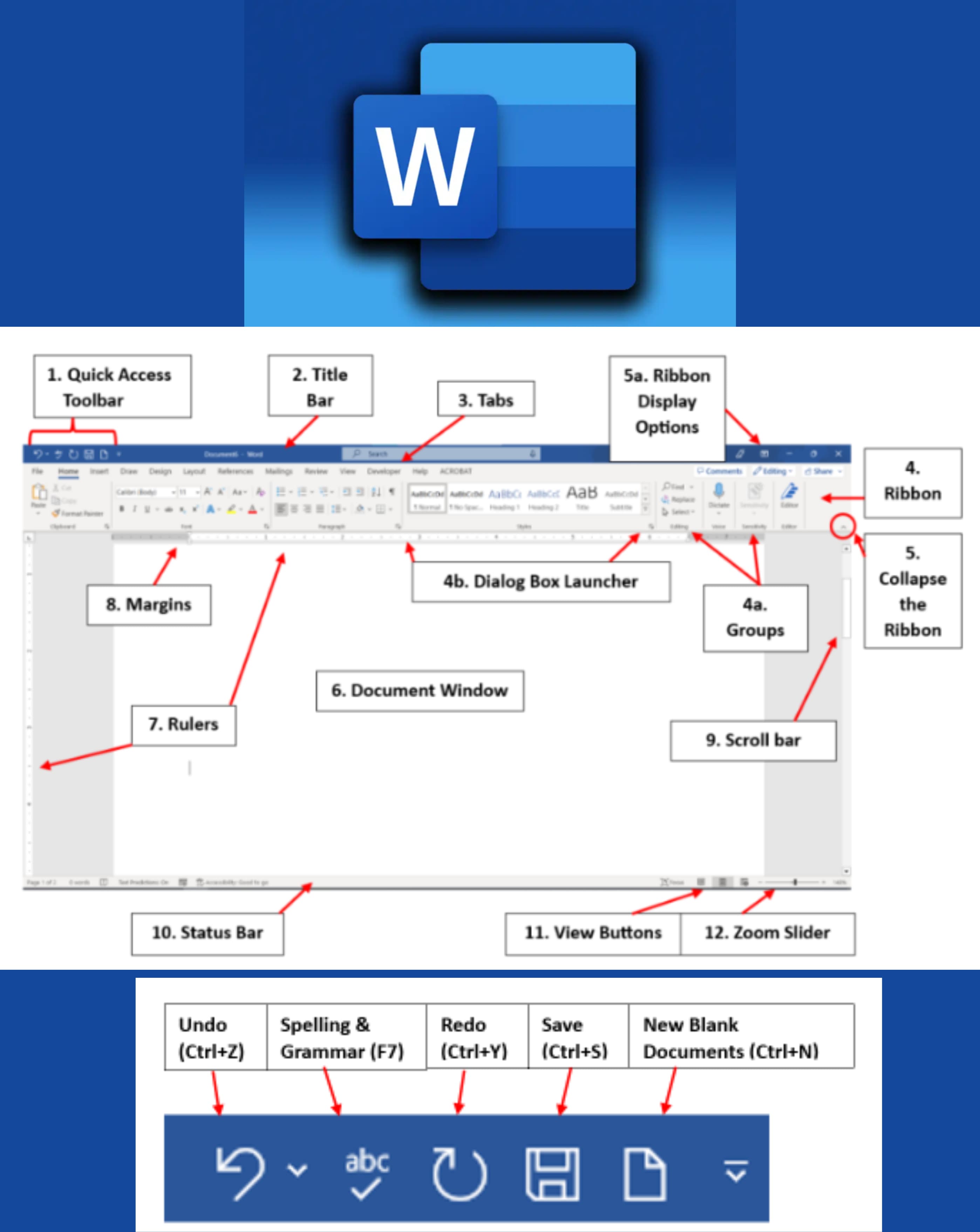
- Q2: Define Title Bar.Ans: The Title Bar is the topmost bar of the MS-Word window that displays the name of the document and the application.
- Q3: Describe the functions performed by MS-Word in the computer.Ans: MS-Word allows users to create, edit, format, save, and print text documents with features like spell check, tables, and graphics insertion.
- Q4: Why are tab settings used in MS-Word?Ans: Tab settings in MS-Word are used to align text properly and organize content into columns or sections.
- Q5: Write a method to create a table in MS-Word.Ans: To create a table, go to the Insert tab, click on Table, then select the number of rows and columns needed.
- Q6: What is the shortcut for undo and redo in MS-Word?Ans: The shortcut for Undo is Ctrl + Z, and the shortcut for Redo is Ctrl + Y.
- Q7: How to create a new Word document?Ans: To create a new Word document:
- ➔ Open MS-Word
- ➔ Click on File → New
- ➔ Choose Blank Document
- Q8: How to save a new Word document?Ans: To save a new Word document:
- ➔ Click on File → Save As
- ➔ Choose the location
- ➔ Enter the file name
- ➔ Click Save
- Q9: How to print a Word document?Ans: To print a Word document:
- ➔ Click File → Print
- ➔ Select the printer
- ➔ Set the preferences
- ➔ Click Print
- Q10: Explain the methods of inserting page number to a Word document.Ans: To insert page numbers:
- ➔ Go to the Insert tab
- ➔ Click Page Number
- ➔ Choose the position and style
- ➔ The page numbers will be added
- Q11: How to save a Word file in PDF format?Ans: To save a Word file in PDF format:
- ➔ Click File → Save As
- ➔ Choose PDF from the "Save as type" dropdown
- ➔ Click Save
- Q12: How to delete a row or column in a table in MS-Word?Ans: To delete a row or column:
- ➔ Right-click on it
- ➔ Select Delete Cells
- ➔ Choose Delete entire row or Delete entire column
- Q13: How to insert a text box in MS-Word?Ans: To insert a text box:
- ➔ Go to the Insert tab
- ➔ Click Text Box
- ➔ Choose a style or draw your own
- Q14: What is the shortcut for align text left and align text right in MS-Word?Ans: The shortcut for Align Left is Ctrl + L, and for Align Right is Ctrl + R.
- Q15: Name 4 programs of MS Office.Ans: The programs are:
- ➔ MS Word
- ➔ MS Excel
- ➔ MS PowerPoint
- ➔ MS Outlook
- Q16: Define MS Office.Ans: MS Office is a suite of productivity applications developed by Microsoft, including Word, Excel, PowerPoint, and others.
- Q17: How to insert a Symbol in MS-Word?Ans: To insert a symbol:
- ➔ Go to the Insert tab
- ➔ Click Symbol
- ➔ Select the desired symbol from the list
- Q18: How to insert a Picture in MS-Word?Ans: To insert a picture:
- ➔ Click the Insert tab
- ➔ Select Pictures
- ➔ Choose a picture from your device
- ➔ Click Insert
- Q19: What is the extension of the MS-Word file?Ans: The file extension of an MS-Word document is .docx.