INTERNET AND EMAIL
Other Chapters
INTRODUCTION TO COMPUTERSMS-WINDOWSMS-WORDMS-EXCELMS-POWERPOINTINTERNET AND EMAILAutoCAD MENUSCO-ORDINATE SYSTEM IN ARCHITECTURAL DRAWINGSDISPLAY COMMANDSDRAW COMMANDSCONSTRUCT & EDIT COMMANDSFILE COMMANDSSETTINGS IN ARCHITECTURAL DRAWINGSINTERNATIONAL CAD STANDARDS
- Q1: Define Email.Ans: Email is an electronic message sent or received over the internet.
- Q2: Define the Internet.Ans: The Internet is a global network connecting millions of computers for sharing information.
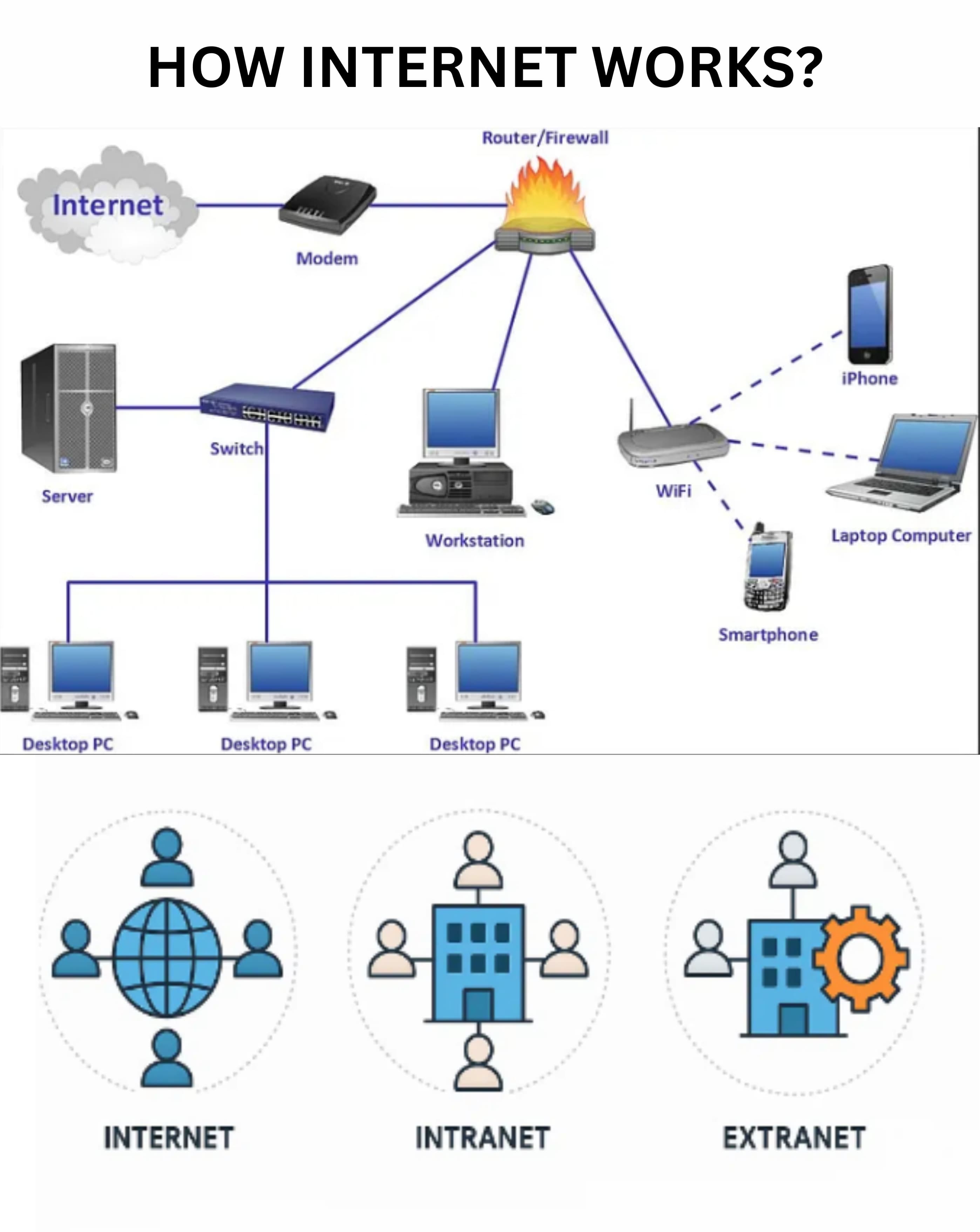
- Q3: Define Intranet.Ans: An intranet is a private network accessible only to an organization’s members.
- Q4: Define URL.Ans: URL (Uniform Resource Locator) is the address used to access websites on the internet.
- Q5: Define Search Engine.Ans: A search engine is a tool that helps users find information on the internet.
- Q6: Name 4 Search engines.Ans: Some of the search engines are:
- ➔ Bing
- ➔ Yahoo
- ➔ Baidu
- ➔ DuckDuckGo
- Q7: Define Web Browser.Ans: A web browser is software used to access and view websites.
- Q8: Name 4 parts of Web Browser.Ans: The parts are:
- ➔ Address bar
- ➔ Navigation buttons
- ➔ Bookmarks bar
- ➔ Status bar
- Q9: Name 4 Web Browsers.Ans: Some of the Web browsers are:
- ➔ Google Chrome
- ➔ Mozilla Firefox
- ➔ Microsoft Edge
- ➔ Safari
- Q10: How does the internet work?Ans: The internet works by connecting computers through a network of servers using protocols to exchange data.
- Q11: Why are search engines used?Ans: Search engines are used to find relevant information quickly on the internet.
- Q12: What does “www” stand for?Ans: "www" stands for World Wide Web.
- Q13: Differentiate between “http” and “https”.Ans: HTTP is unsecured, while HTTPS is secure and encrypts data for safer communication.
- Q14: Write 4 advantages of the internet.Ans: The advantages are:
- ➔ Easy communication
- ➔ Access to information
- ➔ Online education
- ➔ Online shopping
- Q15: Write 4 disadvantages of the internet.Ans: The disadvantages are:
- ➔ Privacy risks
- ➔ Cyberbullying
- ➔ Misinformation
- ➔ Addiction
- Q16: Define ISP.Ans: ISP stands for Internet Service Provider, which provides internet access to users.
- Q17: What is the function of ISP?Ans: ISP connects users to the internet and provides related services.
- Q18: Define Website.Ans: A website is a collection of related web pages under a single domain name.
- Q19: What do you know about internet surfing?Ans: Internet surfing means browsing or exploring different websites on the internet.
- Q20: Define Web Crawler.Ans: A web crawler is a program that scans websites and indexes content for search engines.
- Q21: Define Web Page.Ans: A web page is a single document on the internet, usually written in HTML.
- Q22: How are web pages saved?Ans: Web pages are saved as HTML files on web servers.
- Q23: Write 4 advanced features of the search engines.Ans: The features are:
- ➔ Boolean search
- ➔ Image search
- ➔ Voice search
- ➔ Filters for date or region
- Q24: How do we send a file through email?Ans: Attach the file to the email using the attachment option before sending.
- Q25: Define LAN.Ans: LAN (Local Area Network) is a network connecting computers within a limited area like a building.
- Q26: Define WAN.Ans: WAN (Wide Area Network) is a network that covers a large geographical area.
- Q27: Define WLAN.Ans: WLAN (Wireless LAN) is a LAN that uses wireless technology.
- Q28: Define IP.Ans: IP (Internet Protocol) is an address that identifies devices on a network.
- Q29: Define Web address.Ans: A web address is the URL used to access a specific web page.
- Q30: Define FAQ.Ans: FAQ (Frequently Asked Questions) is a list of common questions and answers about a topic.
- Q31: Define HTML.Ans: HTML (HyperText Markup Language) is the code used to create web pages.
- Q32: Define Post.Ans: A post is a message or content published on a website or social media.
- Q33: Define Newbie.Ans: A newbie is a beginner or someone new to a computer or internet activity.
- Q34: Write steps to create an Email Account.Ans: To create an email account:
- ➔ Visit an email provider website
- ➔ Click Sign Up
- ➔ Fill in personal details
- ➔ Choose a username and password
- ➔ Follow the verification steps
- Q35: Define Social Networking.Ans: Social networking is connecting and interacting with people online through social media platforms.
- Q36: Name 4 Social Networks.Ans: These are: