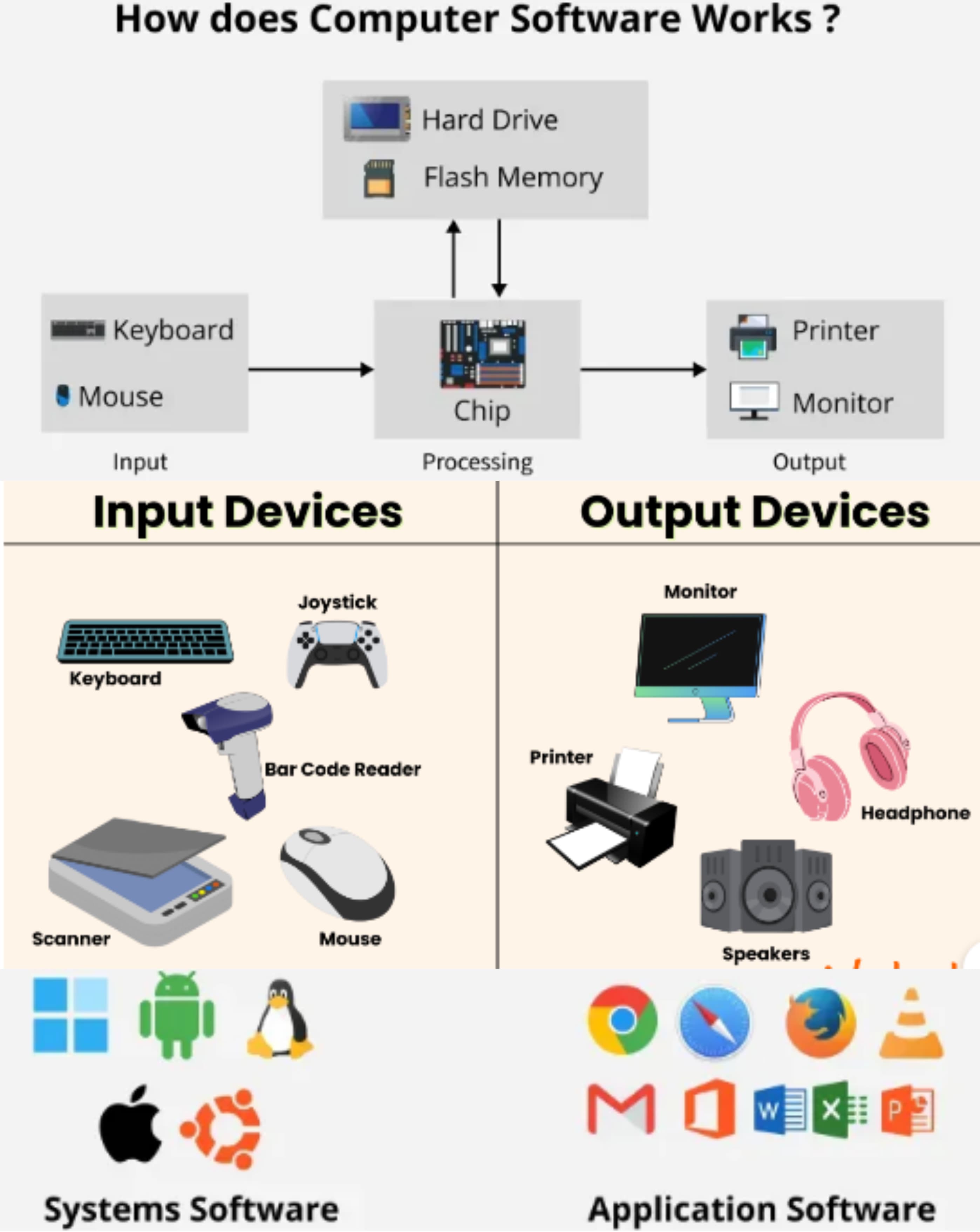
Q1: Define Computer.
Ans: A computer is an electronic device that processes data and performs tasks according to instructions.
Q2: Write some uses of computers.
Ans:
Some of the uses are:- ➔ Education
- ➔ Communication
- ➔ Data storage
- ➔ Designing
- ➔ Entertainment
- ➔ Banking
- ➔ Business work
- ➔ Internet browsing
Q3: Write 4 uses of computers in business.
Ans:
The uses are:- ➔ Accounting
- ➔ Payroll management
- ➔ Inventory control
- ➔ Online communication
Q4: Write 4 uses of computers in education.
Ans:
The uses are:- ➔ Online learning
- ➔ Research work
- ➔ Exam preparation
- ➔ Digital classrooms
Q5: Name different parts of the computer.
Ans:
Some of the parts are:- ➔ Monitor
- ➔ CPU
- ➔ Keyboard
- ➔ Mouse
- ➔ Printer
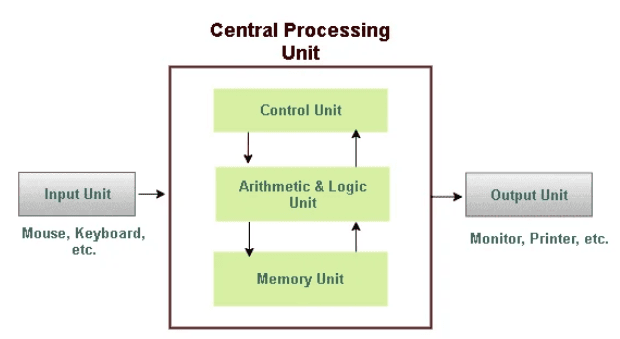
Q6: Explain through a diagram how a computer works.
Ans:
Q7: What does E.D.P stand for?
Ans: E.D.P stands for Electronic Data Processing.
Q8: Define Data Processing.
Ans: Data processing is the collection and conversion of raw data into meaningful information.
Q9: Define Electronic Data Processing.
Ans: Electronic Data Processing is the use of computers to process data electronically.
Q10: Define Information.
Ans: Information is processed data that is meaningful and useful.
Q11: Define Information Technology (IT).
Ans: Information Technology is the use of computers and software to store, process, and share information.
Q12: Define the role of computers in engineering.
Ans: Computers help engineers in designing, testing, analyzing data, and solving complex engineering problems.
Q13: Define Storage devices.
Ans: Devices used to store data and files, e.g., hard drives, USB drives are called storage devices.
Q14: What do you know about desktops?
Ans: A desktop is a personal computer designed to be used at a fixed location.
Q15: Define Hardware.
Ans: The physical components of a computer system that we can touch are called hardware.
Q16: Name 4 Hardwares.
Ans:
The hardwares are:- ➔ Keyboard
- ➔ Mouse
- ➔ Monitor
- ➔ CPU
Q17: Define Software.
Ans: A set of instructions that tells the computer what to do is called software.
Q18: Name 4 Softwares.
Ans:
The softwares are:- ➔ Windows
- ➔ MS Word
- ➔ Excel
- ➔ PowerPoint
Q19: Define Automation.
Ans: Automation is the use of machines and computers to perform tasks without human effort.
Q20: Define CAD Software.
Ans: CAD software is used to create and design drawings and models on a computer.
Q21: What is the use of CAD Software?
Ans: CAD software is used for designing buildings, machines, and engineering models.
Q22: Define CFD Software.
Ans: CFD software is used to analyze the flow of liquids and gases using computers.
Q23: What is the use of CFD Software?
Ans: CFD software is used to study fluid flow, heat transfer, and air movement.
Q24: Define Input Unit.
Ans: The input unit is the part of a computer that accepts data from the user.
Q25: Define Input devices.
Ans: Devices that are used to enter data into a computer are called input devices. Examples: Mouse, Keyboard etc.
Q26: Name 4 Input devices.
Ans:
The input devices are:- ➔ Keyboard
- ➔ Mouse
- ➔ Scanner
- ➔ Microphone
Q27: Define Output Unit.
Ans: The output unit shows the result of processed data.
Q28: Define Output devices.
Ans: Devices that show the result of processed data are called output devices. Examples: Monitor, Printer etc.
Q29: Name 4 Output devices.
Ans:
The output devices are:- ➔ Monitor
- ➔ Printer
- ➔ Speaker
- ➔ Projector
Q30: Define System Unit.
Ans: The system unit is the main part of a computer that contains the CPU and internal components.
Q31: Define System Devices.
Ans: System devices are internal components required for computer operation.
Q32: Name 4 System devices.
Ans:
The system devices are:- ➔ CPU
- ➔ Motherboard
- ➔ RAM
- ➔ Power Supply
Q33: What is the most widely used keyboard layout?
Ans: The QWERTY keyboard layout is the most widely used.
Q34: Define Magnetic disk.
Ans: A storage device that uses magnetic storage to store data is called a magnetic disk.
Q35: Define Floppy disk.
Ans: A small, removable magnetic storage device used in older computers is called a floppy disk.
Q36: Define Flash drive.
Ans: A small, portable USB storage device used to store and transfer data is called a flash drive.
Q37: Define Keyboard.
Ans: A keyboard is an input device used to type data into a computer.
Q38: Define Mouse.
Ans: A mouse is a pointing device used to control the cursor on the screen.
Q39: Name the types of mouse.
Ans:
The types are:- ➔ Mechanical mouse
- ➔ Optical mouse
- ➔ Wireless mouse
Q40: Name the operations performed through a mouse.
Ans:
The operations are:- ➔ Click
- ➔ Double-click
- ➔ Drag and drop
- ➔ Scroll
Q41: Define Trackball.
Ans: A trackball is an input device that uses a rolling ball to move the pointer.
Q42: Define Joystick.
Ans: A joystick is an input device used mainly for playing games and simulations.
Q43: Define Touchpad.
Ans: A touchpad is a flat input device that senses finger movement to control the cursor.
Q44: Define Light pen.
Ans: A light pen is an input device used to point or draw directly on the computer screen.
Q45: Define USB.
Ans: USB stands for Universal Serial Bus and is used to connect devices to a computer.
Q46: Define Microphone.
Ans: A microphone is an input device used to record sound into a computer.
Q47: Define Speaker.
Ans: A speaker is an output device used to produce sound from a computer.
Q48: Define Plotter.
Ans: A plotter is an output device used to print large drawings and designs.
Q49: Define Monitor.
Ans: A monitor is an output device that displays text, images, and videos on the screen.
Q50: Name the types of monitors.
Ans:
The types are:- ➔ CRT Monitor
- ➔ LCD Monitor
- ➔ LED Monitor
- ➔ Plasma Monitor
Q51: Define CRT Monitors.
Ans: CRT monitors use electron beams to display images on the screen.
Q52: Define Plasma Monitors.
Ans: Plasma monitors use small gas cells to produce images on the screen.
Q53: Define Touch screen.
Ans: A touch screen allows users to interact with the computer by touching the screen.
Q54: Define Digital Camera.
Ans: A digital camera is used to capture photos and videos in digital form.
Q55: What does CRT stand for?
Ans: CRT stands for Cathode Ray Tube.
Q56: What does LED stand for?
Ans: LED stands for Light Emitting Diode.
Q57: What does LCD stand for?
Ans: LCD stands for Liquid Crystal Display.
Q58: Define Printer.
Ans: A printer is an output device used to print text and images on paper.
Q59: Name two types of Printers.
Ans: The two types of printers are Impact printers and Non-impact printers.
Q60: Name 4 Impact Printers.
Ans:
The impact printers are:- ➔ Dot Matrix Printer
- ➔ Daisy Wheel Printer
- ➔ Line Printer
- ➔ Drum Printer
Q61: Name 4 Non-Impact Printers.
Ans:
The non-impact printers are:- ➔ Inkjet Printer
- ➔ Laser Printer
- ➔ Thermal Printer
- ➔ Photo Printer
Q62: Write 4 main parts of Impact Printers.
Ans:
The main parts are:- ➔ Print head
- ➔ Ribbon
- ➔ Paper feed mechanism
- ➔ Motor
Q63: Write 4 main parts of Non-Impact Printers.
Ans:
The main parts are:- ➔ Ink or toner cartridge
- ➔ Drum
- ➔ Paper tray
- ➔ Control circuit
Q64: Define Line Printer.
Ans: A line printer is an impact printer that prints one full line at a time.
Q65: Define Laser Printer.
Ans: A laser printer is a non-impact printer that uses laser technology to print.
Q66: What is the speed of a Laser Printer?
Ans: The speed of a laser printer is measured in pages per minute (PPM).
Q67: State some important features of Laser printers.
Ans:
The features are:- ➔ High speed
- ➔ Sharp print quality
- ➔ Low noise
- ➔ Cost-effectiveness for bulk printing
Q68: What does LASER stand for?
Ans: LASER stands for Light Amplification by Stimulated Emission of Radiation.
Q69: Define Hardcopy.
Ans: Hardcopy is the printed output produced on paper.
Q70: Define Softcopy.
Ans: Softcopy is the output displayed on a screen.
Q71: How many pins are there in dot matrix heads?
Ans: Dot matrix printer heads usually have 9 or 24 pins.
Q72: Which unit is used to measure the speed of a dot matrix printer?
Ans: The speed of a dot matrix printer is measured in characters per second (CPS).
Q73: Write some benefits of USB.
Ans:
Some of the benefits are:- ➔ Portable
- ➔ Easy to use
- ➔ Provide fast data transfer
- ➔ Are reusable
Q74: Define USB.
Ans: A standard device used to connect peripherals to a computer is called a USB (Universal Serial Bus). OR USB is a standard way to connect devices to a computer for data transfer and power.
Q75: What do you know about a Scanner?
Ans: A scanner is a device that converts physical documents into digital format.
Q76: What are Application Softwares?
Ans: Software designed to perform specific tasks for users is called application software.
Q77: Write any 4 important features of Application softwares.
Ans:
The features are:- ➔ User-friendliness
- ➔ Task-specificity
- ➔ Ease of updates
- ➔ Efficient performance
Q78: Define System Software.
Ans: System software controls the operation of the computer and hardware.
Q79: Define Custom-built Software.
Ans: Custom-built software is developed to meet specific user requirements.
Q80: Define Packaged Software.
Ans: Packaged software is ready-made software available for general use.
Q81: Define Operating System.
Ans: An operating system controls computer hardware and software resources.
Q82: What are CRT monitors?
Ans: CRT (Cathode Ray Tube) monitors are bulky display screens that use cathode ray tubes to display images.
Q83: What is a Laptop?
Ans: A laptop is a portable personal computer that can be used anywhere.
Q84: Define Digital Computers.
Ans: Digital computers process data in the form of numbers and binary digits (0 and 1).
Q85: Write the classification of Digital Computers.
Ans:
Digital computers are classified into:- ➔ Super Computers
- ➔ Mainframe Computers
- ➔ Mini Computers
- ➔ Micro Computers
Q86: Define Analogue Computers.
Ans: Analogue computers process data in continuous form such as temperature or speed.
Q87: Define Super Computers.
Ans: Super computers are very powerful computers used for complex scientific calculations.
Q88: Define Mainframe Computers.
Ans: Mainframe computers are large computers used by big organizations to handle large amounts of data.
Q89: Define Special Purpose Computers.
Ans: Computers designed to perform a specific task are called special purpose computers.
Q90: Define Hybrid Computers.
Ans: Computers that combine the features of both analog and digital computers are called hybrid computers.
Q91: Define Micro computers.
Ans: Small and affordable personal computers used by individuals are called microcomputers.
Q92: Define Mini computers.
Ans: Medium-sized computers used in businesses and institutions are called minicomputers.
Q93: Define Data.
Ans: Data is raw facts and figures that have no meaning on their own.
Q94: Name the types of data.
Ans:
The types of data are:- ➔ Numeric Data
- ➔ Alphabetic Data
- ➔ Alphanumeric Data
- ➔ Voice/Audio Data
- ➔ Graphic Data
Q95: Define Numeric Data.
Ans: Numeric data consists of numbers only.
Q96: What is the use of Numeric data?
Ans: Numeric data is used for calculations and measurements.
Q97: State the example of Numeric data.
Ans: Examples of numeric data are 25, 100, and 4567.
Q98: Define Alphabetic Data.
Ans: Alphabetic data consists of letters from A to Z.
Q99: What is the use of Alphabetic data?
Ans: Alphabetic data is used to store names and text information.
Q100: State the example of Alphabetic data.
Ans: Examples of alphabetic data are COMPUTER and SCHOOL.
Q101: Define Alphanumeric Data.
Ans: Alphanumeric data consists of both letters and numbers.
Q102: What is the use of Alphanumeric data?
Ans: Alphanumeric data is used for passwords, codes, and usernames.
Q103: State the example of Alphanumeric data.
Ans: Examples of alphanumeric data are A12B and X9Z7.
Q104: Define Voice/Audio Data.
Ans: Voice or audio data includes sound and spoken words.
Q105: What is the use of Audio data?
Ans: Audio data is used for communication and entertainment.
Q106: State the example of Voice data.
Ans: Examples of voice data are recorded speech and songs.
Q107: Define Graphic Data.
Ans: Graphic data includes images, drawings, and pictures.
Q108: What is the use of Graphic data?
Ans: Graphic data is used to show information visually.
Q109: State the example of Graphic data.
Ans: Examples of graphic data are photographs, charts, and diagrams.
Q110: What do you know about CPU?
Ans: The CPU (Central Processing Unit) is the brain of the computer that performs calculations and processes data.
Q111: Name the components of the CPU.
Ans:
The components are:- ➔ Arithmetic Logic Unit (ALU)
- ➔ Control Unit (CU)
- ➔ Memory Unit (MU)
Q112: Define ALU.
Ans: ALU stands for Arithmetic Logic Unit and performs calculations and logical operations.
Q113: What is the function of the Arithmetic Logic Unit?
Ans: The ALU performs arithmetic operations like addition and logical operations like comparison.
Q114: Define CU.
Ans: CU stands for Control Unit and controls all activities of the computer.
Q115: What is the function of the Control Unit?
Ans: The Control Unit directs the flow of data and instructions within the computer.
Q116: Define MU.
Ans: MU stands for Memory Unit and stores data and instructions.
Q117: What is the function of the Memory Unit?
Ans: The Memory Unit stores data, instructions, and results temporarily or permanently.
Q118: Define Memory.
Ans: Memory is the part of a computer used to store data and instructions.
Q119: Name the types of computer Memory.
Ans: The types of memory are Primary Memory and Secondary Memory.
Q120: Define Primary Memory.
Ans: Primary memory is the main memory that stores data currently in use.
Q121: Define Secondary Memory.
Ans: Secondary memory is used to store data permanently.
Q122: Define Volatile Memory.
Ans: Volatile memory loses data when power is switched off.
Q123: Define Non-volatile Memory.
Ans: Non-volatile memory retains data even when power is switched off.
Q124: Define RAM.
Ans: The temporary memory used by a computer while working is called RAM (Random Access Memory).
Q125: Define ROM.
Ans: The permanent memory that stores essential system instructions is called ROM (Read Only Memory).
Q126: Define DRAM.
Ans: DRAM is a type of RAM that needs to be refreshed regularly.
Q127: Define SRAM.
Ans: SRAM is a fast type of RAM that does not need refreshing.
Q128: Define Bit.
Ans: A bit is the smallest unit of data and can be 0 or 1.
Q129: Define Byte.
Ans: A byte is a group of 8 bits.
Q130: One Byte is equal to how many Bits?
Ans: One byte is equal to 8 bits.
Q131: What are some disadvantages of using computers?
Ans:
Some of the disadvantages are:- ➔ Eye strain
- ➔ Cybercrime
- ➔ Job loss
- ➔ Over-dependency
Q132: Define LCD Monitors.
Ans: Flat-panel display screens that use liquid crystal technology are called LCD monitors.
Q133: Name some color monitors.
Ans:
Some color monitors are:- ➔ LCD monitors
- ➔ LED monitors
- ➔ OLED monitors
- ➔ CRT monitors
Q134: Define Programs.
Ans: A set of instructions that a computer follows to perform a task is called a program.
Q135: Define Programming.
Ans: Programming is the process of writing instructions for a computer.
Q136: What do you know about Programming languages?
Ans: Programming languages are used to write software and control the operations of a computer.
Q137: Enlist any 4 programming languages.
Ans:
The languages are:- ➔ Python
- ➔ Java
- ➔ C++
- ➔ HTML
Q138: Define Assembly Language.
Ans: A low-level programming language that is closer to machine code is called assembly language.
Q139: Define Low Level Language.
Ans: A low level language is a programming language that is close to machine language and is hard for humans to understand.
Q140: Define High Level Language.
Ans: A programming language that is easy for humans to understand and use is called a high-level language.
Q141: Name 4 advantages of High Level Language.
Ans:
The advantages are:- ➔ Easy to learn
- ➔ Easy to write
- ➔ Easy to debug
- ➔ Machine independent
Q142: Name 2 disadvantages of High Level Language.
Ans:
The disadvantages are:- ➔ Slower execution
- ➔ Requires translation
Q143: Name the classification of High Level Language.
Ans:
The classifications are:- ➔ Functional Language
- ➔ Procedural Language
- ➔ Object Oriented Language
- ➔ Logic Programming Language
Q144: Define Functional Language.
Ans: Functional language is based on mathematical functions.
Q145: Define Procedural Language.
Ans: Procedural language follows step-by-step procedures.
Q146: Define Object Oriented Programming Language.
Ans: Object oriented language is based on objects and classes.
Q147: Define Logic Programming Language.
Ans: Logic programming language works on logical rules and conditions.
Q148: Define Machine Language.
Ans: Machine language uses binary numbers (0 and 1) to communicate with computers.
Q149: Define language translator.
Ans: A language translator converts program code into machine language.
Q150: Define Compiler.
Ans: A program that converts the entire source code into machine code at once is called a compiler.
Q151: Define Interpreter.
Ans: A program that translates and executes code line by line is called an interpreter.
Q152: Define Source Program.
Ans: The original code written by a programmer in a high-level language is called a source program.
Q153: Define Assembler.
Ans: An assembler converts assembly language into machine language.
Q154: Define Source Code.
Ans: Source code is the program written by the programmer.
Q155: Define Executable Code.
Ans: Executable code is the machine-readable form of a program.
Q156: Define PASCAL.
Ans: PASCAL is a high-level programming language used mainly for teaching and academic purposes.
Q157: Define FORTRAN.
Ans: FORTRAN is a high-level programming language used for scientific and engineering applications.
Q158: Write the full form of the following.
Ans:
| Abbreviation | Full Form |
|---|
| RAM | Random Access Memory |
| ROM | Read Only Memory |
| DRAM | Dynamic Random Access Memory |
| SRAM | Static Random Access Memory |
| BIOS | Basic Input Output System |
| PROM | Programmable Read Only Memory |
| EPROM | Erasable Programmable Read Only Memory |
| EEPROM | Electrically Erasable Programmable Read Only Memory |
| BIT | Binary Digit |
| CD | Compact Disc |
| CD-R | Compact Disc Recordable |
| CD-RW | Compact Disc Rewritable |
| DVD | Digital Versatile Disc |
| BD | Blu-ray Disc |
| DOS | Disk Operating System |
| BASIC | Beginners All-purpose Symbolic Instruction Code |
| FORTRAN | Formula Translation |
| OOP | Object Oriented Programming |
| USB | Universal Serial Bus |
| CPU | Central Processing Unit |
| OS | Operating System |
| GUI | Graphical User Interface |