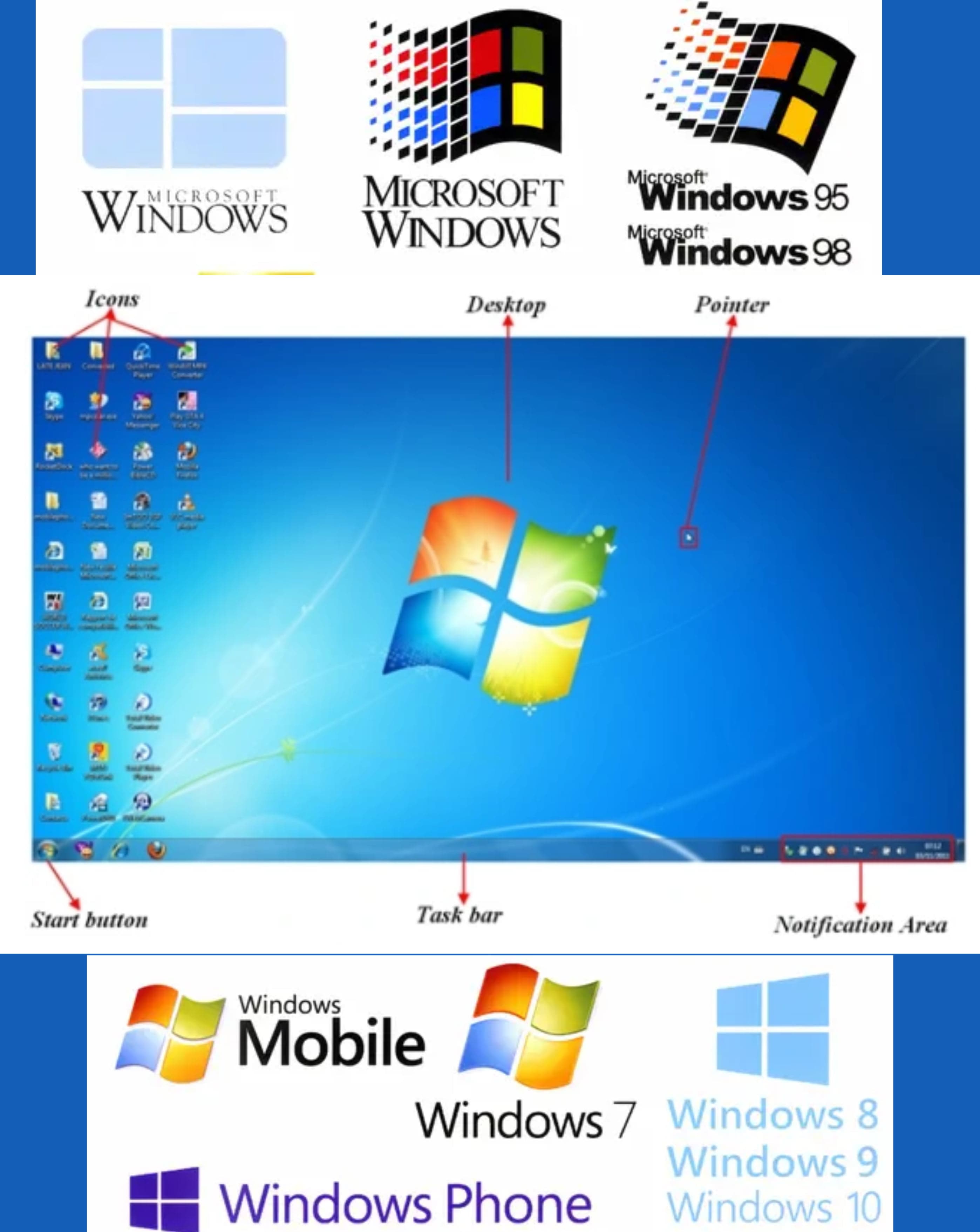
Q1: Define MS Windows.
Ans: MS Windows is an operating system developed by Microsoft that allows users to interact with their computer through a graphical user interface.
Q2: What are the examples of Windows?
Ans:
Following are the examples:- ➔ Windows XP
- ➔ Windows 7
- ➔ Windows 8
- ➔ Windows 10
- ➔ Windows 11
Q3: What is the purpose of installing Windows?
Ans: The purpose of installing Windows is to manage computer hardware and software and provide a user-friendly interface for users.
Q4: Define Operating System.
Ans: An operating system is system software that controls computer hardware and allows users to run programs.
Q5: Define Windows Operating System.
Ans: Windows is an operating system developed by Microsoft that uses a graphical user interface.
Q6: Name some Operating Systems.
Ans:
Some of teh Operating Systemes are:- ➔ Linux
- ➔ Windows
- ➔ Android
- ➔ macOS
- ➔ iOS
Q7: What do you know about Windows 11?
Ans: Windows 11 is the latest version of Microsoft Windows with a modern design, better performance, and enhanced security.
Q8: Define GUI.
Ans: GUI stands for Graphical User Interface and allows users to interact with the computer using icons, windows, and menus.
Q9: Name some new features of WINDOWS 11.
Ans:
The new features are:- ➔ Centered Start Menu
- ➔ New taskbar design
- ➔ Better multitasking (Snap layouts)
- ➔ Improved security
Q10: Define Folder.
Ans: A folder is used to store and organize files on a computer.
Q11: Define Desktop.
Ans: The desktop is the main screen that appears after starting the computer.
Q12: Define Desktop screen.
Ans: The desktop screen is the working area where icons, files, and the taskbar are displayed.
Q13: What icons can be seen in a task bar?
Ans:
The icons are:- ➔ Start button
- ➔ Search icon
- ➔ Running applications
- ➔ System tray icons
Q14: Name 4 uses of Control Panel.
Ans:
The uses are:- ➔ Change system settings
- ➔ Add or remove programs
- ➔ Manage hardware devices
- ➔ Change user accounts
Q15: How can we search a file in Windows 11?
Ans: We can search a file using the Search box on the taskbar or File Explorer.
Q16: Define Shortcut.
Ans: A shortcut is a quick link to open a file, folder, or program.
Q17: Define Cortana.
Ans: Cortana is a virtual assistant in Windows used to search and give voice commands.
Q18: What is an aero graphical user interface in Windows 10?
Ans: Aero GUI provides transparent windows and visual effects in Windows 10.
Q19: What is “Windows Hello”?
Ans: Windows Hello is a security feature that allows login using face, fingerprint, or PIN.
Q20: What is the minimum capacity of the system for Windows 10?
Ans: Windows 10 requires at least 2 GB RAM and 20 GB storage.
Q21: What is the minimum capacity of the system for Windows 11?
Ans: Windows 11 requires at least 4 GB RAM and 64 GB storage.
Q22: What is meant by system loading?
Ans: System loading is the process of starting the operating system when the computer is turned on.
Q23: Write the shortcut key to log off Windows 7.
Ans: The shortcut key to log off Windows 7 is Ctrl + Alt + Del, then click Log Off.
Q24: Define Control Panel.
Ans: Control Panel is a component of Windows that allows users to view and change system settings.
Q25: How to search a document in MS-Windows?
Ans: To search a document in MS-Windows, open File Explorer and type the file name in the search box.
Q26: How will you create a folder in Windows 10 or 11?
Ans: Right-click on the desktop or inside a folder, select New, then click Folder.
Q27: How will you create a new user in Windows 10 or 11?
Ans: Open Settings, go to Accounts, then select Family & other users and add a new user.
Q28: How will you search for a saved item in Windows 10 or 11?
Ans: Type the file name in the search box on the taskbar or File Explorer.
Q29: What is a screen saver?
Ans: A screen saver is a moving image that appears when the computer is idle.
Q30: What do you understand about screen resolution?
Ans: Screen resolution refers to the clarity of the display measured in pixels.
Q31: How is a file of a specific program identified?
Ans: A file is identified by its file extension such as .docx or .jpg.
Q32: How will you shut down a computer?
Ans: Click the Start button, select Power, and then click Shut down.
Q33: What do you understand by formatting a hard disk?
Ans: Formatting a hard disk means erasing all data and setting up a file system for storing files.
Q34: Differentiate between Hibernate and Shutdown.
Ans: Hibernate saves all open files and programs to the hard disk and powers off, while Shutdown closes all programs and completely turns off the computer.
Q35: Define Icon.
Ans: An icon is a small graphical representation of a program, file, or function on the desktop.
Q36: Name 4 desktop items.
Ans:
The items are:- ➔ My Computer
- ➔ Recycle Bin
- ➔ Network
- ➔ Shortcuts to applications
Q37: Define Task Bar.
Ans: The Task Bar is a horizontal bar at the bottom of the screen that shows open programs and contains the Start menu.
Q38: Define Tool Bar.
Ans: A Tool Bar is a set of icons or buttons that provide quick access to commonly used commands.
Q39: Write 4 menus of Start Button.
Ans:
The menus are:- ➔ All Programs
- ➔ Control Panel
- ➔ Documents
- ➔ Shut Down
Q40: Define Recycle Bin.
Ans: Recycle Bin is a folder where deleted files are temporarily stored until they are permanently removed.
Q41: How do you restore an item from the recycle bin?
Ans: To restore an item from the Recycle Bin, right-click the item and select Restore.
Q42: Write 2 ways in which files and folders can be managed on the computer.
Ans:
Files and folders can be managed by:- ➔ Using File Explorer
- ➔ Organizing them into directories
Q43: How will you rename a file?
Ans: To rename a file, right-click the file and choose Rename, then type the new name and press Enter.
Q44: How a program is un-installed from a computer?
Ans: To uninstall a program, go to the Control Panel, click on Programs, then select Uninstall a Program and choose the program to remove.
Q45: List 4 important functions of MS-Windows.
Ans:
Some of the functions are:- ➔ File management
- ➔ Multitasking
- ➔ Hardware control
- ➔ User interface management
Q46: List 4 important features of MS-Windows.
Ans:
Some of the features are:- ➔ Graphical user interface
- ➔ Plug and play
- ➔ Security features
- ➔ Support for multitasking
Q47: How do you close a program?
Ans: To close a program, click the X button on the top-right corner of the window or press Alt + F4.
Q48: How do you find a file on a computer?
Ans: To find a file, open File Explorer and type the file name in the search bar.
Q49: Define WordPad.
Ans: WordPad is a basic word processing application included in Windows for creating and editing text documents.
Q50: How do you start a WordPad?
Ans:
To start WordPad:- ➔ Click the Start menu
- ➔ Type WordPad in the search bar
- ➔ Press Enter
Q51: How to install a program?
Ans: To install a program, run the setup file and follow the on-screen installation instructions.
Q52: How can you uninstall a program?
Ans: To uninstall a program, open Control Panel, go to 'Programs and Features', select the program you want to remove, and click 'Uninstall'.