Q1: Define Spreadsheet Program.
Ans: A spreadsheet program is a software application used to organize, calculate, and analyze data in rows and columns.
Q2: Define MS Excel.
Ans: MS Excel is a spreadsheet software developed by Microsoft used for data organization, calculation, and analysis.
Q3: Define Spreadsheet.
Ans: A Spreadsheet is an electronic document made up of rows and columns used for organizing and calculating data.
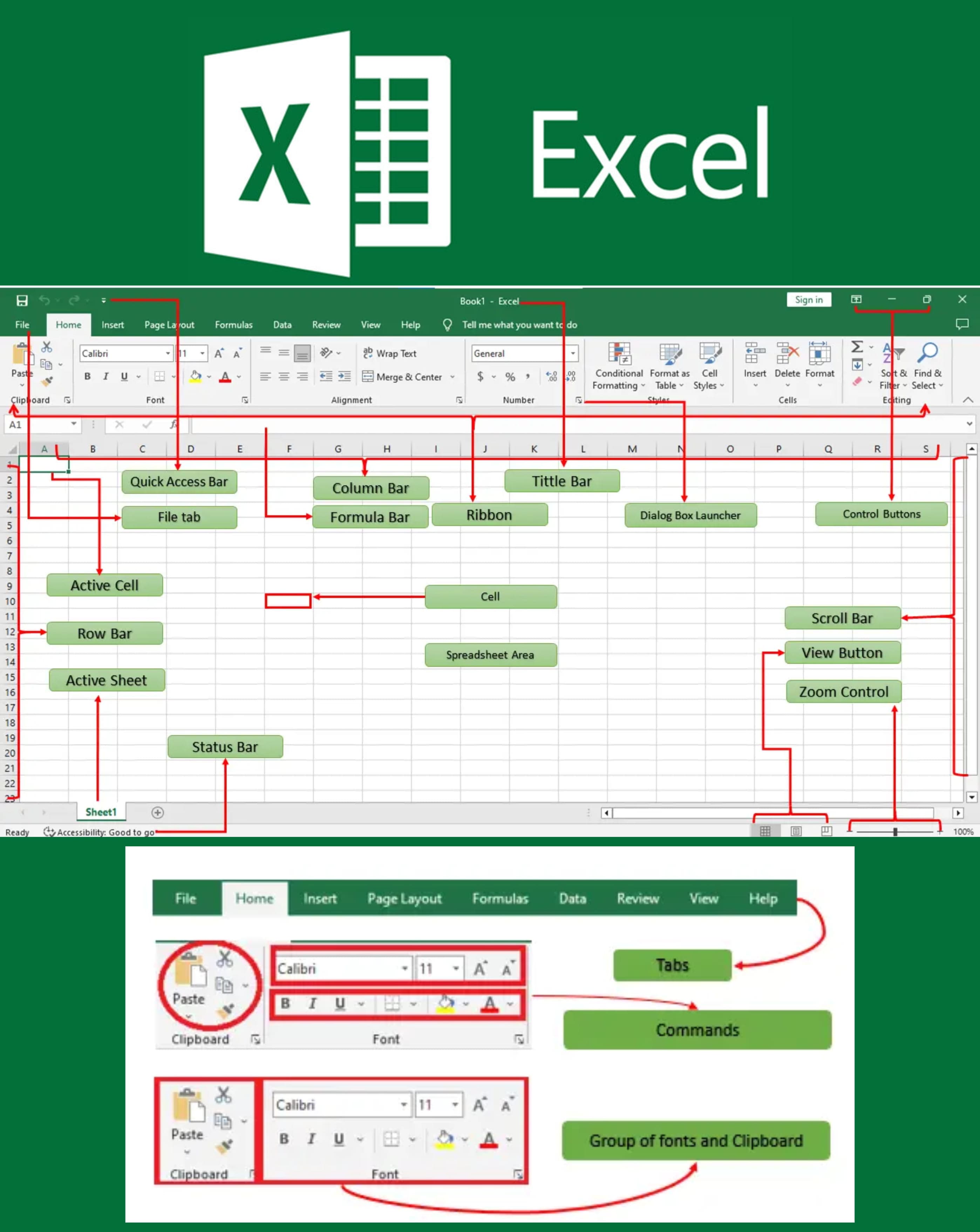
Q4: Define Title bar.
Ans: The Title Bar is the topmost bar in Excel that displays the name of the open workbook and the application.
Q5: Define Formula in MS Excel.
Ans: A formula is an expression used to perform calculations on data, starting with an equals sign (=).
Q6: Define Formula bar.
Ans: The Formula Bar is a toolbar in Excel where you can enter or edit data and formulas in the selected cell.
Q7: Write steps to make a formula in Excel with an example.
Ans:
The steps are:- ➔ Click a cell
- ➔ Type
=A1+B1 to add values of cells A1 and B1 - ➔ Press Enter
Q8: Define Workbook in MS Excel.
Ans: A workbook is an Excel file that contains one or more worksheets.
Q9: Define Name Box in MS Excel.
Ans: The Name Box displays the address of the active cell and can also be used to name a cell or range.
Q10: Define Cell in MS Excel.
Ans: A cell is the intersection of a row and a column where data is entered.
Q11: Define Active Cell in MS Excel.
Ans: The active cell is the currently selected cell where data can be entered.
Q12: Define WorkSheet in Excel.
Ans: A Worksheet is a single spreadsheet within an Excel workbook consisting of rows and columns for data entry.
Q13: Define Worksheet Tab in MS Excel.
Ans: Worksheet tabs are used to switch between different worksheets in a workbook.
Q14: Define Row Heading in MS Excel.
Ans: Row headings are numbered labels on the left side of the worksheet that identify each row.
Q15: Define Column Heading in MS Excel.
Ans: Column headings are lettered labels at the top of the worksheet that identify each column.
Q16: Write 2 ways of entering data in MS Excel.
Ans:
Data can be entered in the following ways:- ➔ Typing directly into a cell
- ➔ Entering data through the Formula Bar
Q17: What type of data can be entered in MS Excel?
Ans: Text, numbers, formulas, and dates can be entered in MS Excel.
Q18: How to enter data on a new line in MS Excel?
Ans: Press Alt + Enter while typing in a cell to enter data on a new line.
Q19: Define Functions in MS Excel.
Ans: Functions are predefined formulas in Excel used to perform specific calculations easily.
Q20: Name the categories of functions in MS Excel.
Ans:
Categories of functions include:- ➔ Mathematical
- ➔ Statistical
- ➔ Logical
- ➔ Text
- ➔ Date and Time
Q21: Name the arithmetic operators used in MS Excel.
Ans: Addition (+), Subtraction (-), Multiplication (*), Division (/), and Exponentiation (^).
Q22: Define Cell Formatting in MS Excel.
Ans: Cell formatting is used to change the appearance of cells, such as font, color, alignment, and borders.
Q23: Define Cell Range in MS Excel.
Ans: A cell range is a group of selected cells in a worksheet.
Q24: How can we edit a cell entry in MS Excel?
Ans: Double-click the cell or press F2 to edit a cell entry.
Q25: What is Data Alignment in MS Excel?
Ans: Data alignment refers to the positioning of data within a cell, such as left, center, or right alignment.
Q26: Define Charts in MS Excel.
Ans: Charts are graphical representations of data used to visualize information easily.
Q27: Name the types of charts used in MS Excel.
Ans:
Types of charts include:- ➔ Column Chart
- ➔ Bar Chart
- ➔ Line Chart
- ➔ Pie Chart
- ➔ Area Chart
Q28: Name the elements of charts used in MS Excel.
Ans:
The elements of charts are as follows:- ➔ Chart Title
- ➔ Axis
- ➔ Data series
- ➔ Legend
- ➔ Gridlines
Q29: Write steps to make a chart in Excel.
Ans:
The steps are:- ➔ Select data
- ➔ Go to the Insert tab
- ➔ Choose the desired chart type
- ➔ Click to insert it
Q30: Define Pie Chart.
Ans: A Pie Chart is a circular chart divided into sectors representing proportions of data.
Q31: Define Bar Chart.
Ans: A bar chart displays data using horizontal bars.
Q32: Define Area Chart.
Ans: An area chart shows data trends using filled areas under lines.
Q33: Define Line Chart.
Ans: A line chart displays data trends using connected line segments.
Q34: Define Column Chart.
Ans: A column chart displays data using vertical bars.
Q35: Define Clipboard.
Ans: The clipboard is a temporary storage area used to hold copied or cut data.
Q36: How can you print documents in Excel?
Ans:
To print a document:- ➔ Click File → Print
- ➔ Choose the printer and settings
- ➔ Click Print
Q37: How can you apply formulas in Excel?
Ans: Click the cell, type = followed by the formula, and press Enter to apply it.
Q38: How can you store data in a column in Excel?
Ans: Enter data in the cells vertically down a column (e.g., A1, A2, A3).
Q39: How can you delete rows in Excel?
Ans: Right-click the row number and select Delete to remove a row.
Q40: How can you insert a row in Excel?
Ans: Right-click the row number where you want to insert, then select Insert.
Q41: How will you arrange scattered data in a cell in Excel?
Ans: Use the Sort function from the Data tab to arrange data in order.
Q42: How do you open a new Excel file?
Ans: Open Excel and click File → New → Blank Workbook.
Q43: Define AutoSum in Excel.
Ans: AutoSum is a feature that automatically adds a range of numbers and displays the total.
Q44: What is the extension of the MS-Excel file?
Ans: The extension of an MS-Excel file is .xlsx.
Q45: Write the shortcut keys for the following.
Ans:
| Command | Shortcut Key |
|---|
| Save an Excel sheet | Ctrl + S |
| Rename an Excel sheet | Right-click → Rename |
| Subscript | Ctrl + = |
| Superscript | Ctrl + Shift + = |
| Print a sheet | Ctrl + P |
| Add current date | Ctrl + ; |
| Add current time | Ctrl + Shift + ; |
| Open Format Cells dialog box | Ctrl + 1 |
| Edit a cell entry | F2 |
| Exit MS Excel | Alt + F4 |